FX Bug Toolkit
Investigate Firefox bugs, fast. Point it at a bug and it pulls the report, searches Gecko, reads profiles and logs, checks the spec, and writes up a clean, link-rich investigation — then lets you browse them all.
What it does
One hub command — /bug-start — drives an end-to-end investigation. Everything else supports it.
- Pulls the Bugzilla report and searches the Gecko codebase for you.
- Analyzes Firefox Profiler captures and log files for the failure signal.
- Checks spec conformance and writes a structured, searchfox-linked investigation file.
- A local web viewer to search and re-read every past investigation.
- Runs your bug-triage rotation — drafts the comments, sets priority/severity, and gives you a dashboard to review and apply them.
Quick start
Install the plugin
No clone needed — add it straight from GitHub:
claude plugin marketplace add alastor0325/fx-bug-toolkit
claude plugin install fx-bug-toolkit@fx-bug-toolkit
Prefer a local copy to read or hack on? git clone the repo first, then claude plugin marketplace add ./fx-bug-toolkit.
Restart Claude Code
Plugins load at startup. After restarting, type / and you'll see the toolkit's commands (each shows fx-bug-toolkit as its source).
Run setup
/initIt checks your environment and offers to install anything missing (it can install the core CLIs for you). When it says “Core investigation ready,” you're good to go.
/init stalls on profiler-cli: it installs by cloning profiler-cli from GitHub and building it, and Claude Code's auto-mode may decline an agent-run git clone of an external repo. If that happens, run just that one step yourself — paste the command /init shows (or prefix it with ! in the prompt) — then re-run /init; everything else installs normally.All commands
| Command | What it does |
|---|---|
/init | One-time setup + dependency install/health check |
/bug-start <id> | Investigate a Firefox bug end to end |
/analyze-profile <url> | Analyze a Firefox Profiler capture |
/check-log <path> | Diagnose a Firefox log |
/open-investigation | Open the investigation viewer |
/triage [id|url] | Draft the Audio/Video bug triage |
/open-triage | Review & apply the triage drafts in a web UI |
/review <D-rev|local|diff> | AI patch review → structured review doc |
/open-review [repo] | Open Revue, the human patch-review web UI |
/open-team [team] | Open the live per-team review-stats dashboards |
/update | Update the plugin + its CLI dependencies |
A few helpers (spec-check, download-guard, source-links, the gecko-navigator and firefox-review agents) run behind the scenes — Claude calls them from the commands above; you don't invoke them directly.
Investigate a bug
The command you'll use most — give it a Bugzilla bug number:
/bug-start 2044320It runs the whole investigation for you, end to end:
- Pulls the bug — the Bugzilla report and its full comment thread.
- Classifies the failure — crash, regression, performance, incorrect behavior… — so it knows what to look for.
- Reads the evidence — analyzes any attached Firefox Profiler captures, logs, and crash reports.
- Traces it through Gecko — searches the mozilla-central source to pinpoint the responsible code, and the regressing change when it's a regression.
- Checks the spec — confirms what the correct behavior should be against the relevant standard.
- Writes it up — a structured Markdown report where every file, function, and line is a clickable searchfox link, then opens the viewer on that bug:
View this investigation → http://127.0.0.1:8777/viewer.html#2044320What the report looks like
The investigation file opens with a YAML header — a one-line summary, the root cause, the affected files (searchfox-linked), the regression range, related bugs, and a complexity rating — the same fields the viewer and the triage dashboard surface as chips. Below it is the write-up: a Summary, the Problem Analysis (root cause + code analysis), spec-compliance notes, and related context. Run in the default deep mode — what you use right before writing patches — it also lays out an implementation plan, a patch breakdown, and a test strategy; security bugs gain a Security Rating section. It diagnoses — it doesn't write or land the patch.
/bug-start <id> --triage-mode, which /triage uses to stay quick — that stops at the root cause, affected area, and a proposed-solution sketch, skipping the implementation plan, patch breakdown, and test strategy. The viewer and dashboard flag a shallow write-up as “shallow · re-run for deep”; running /bug-start <id> again later overwrites it with the full investigation.Run the analyzers on their own
The evidence-reading tools /bug-start leans on are full commands too — handy when you just have a capture or a log and no bug to attach it to yet:
/analyze-profile https://share.firefox.dev/public/...   # a Firefox Profiler capture
/check-log /path/to/firefox.log # a Firefox log file/analyze-profile— runs a standard query set over a Profiler capture, checks the relevant threads, pattern-matches known signatures, and returns a findings report./check-log— diagnoses a Firefox log: process crashes, HRESULT andNS_ERRORcodes, and the like — with extra depth for media/EME/CDM issues (hardware-context resets, CDM crashes).
To revise an existing write-up, just ask in plain language — “update the investigation for bug 2044320 with this new root cause.”
Browse investigations
/open-investigationBuilds an index of every investigation (across all your folders) and serves a fast, searchable viewer on 127.0.0.1 — your data never leaves the machine.
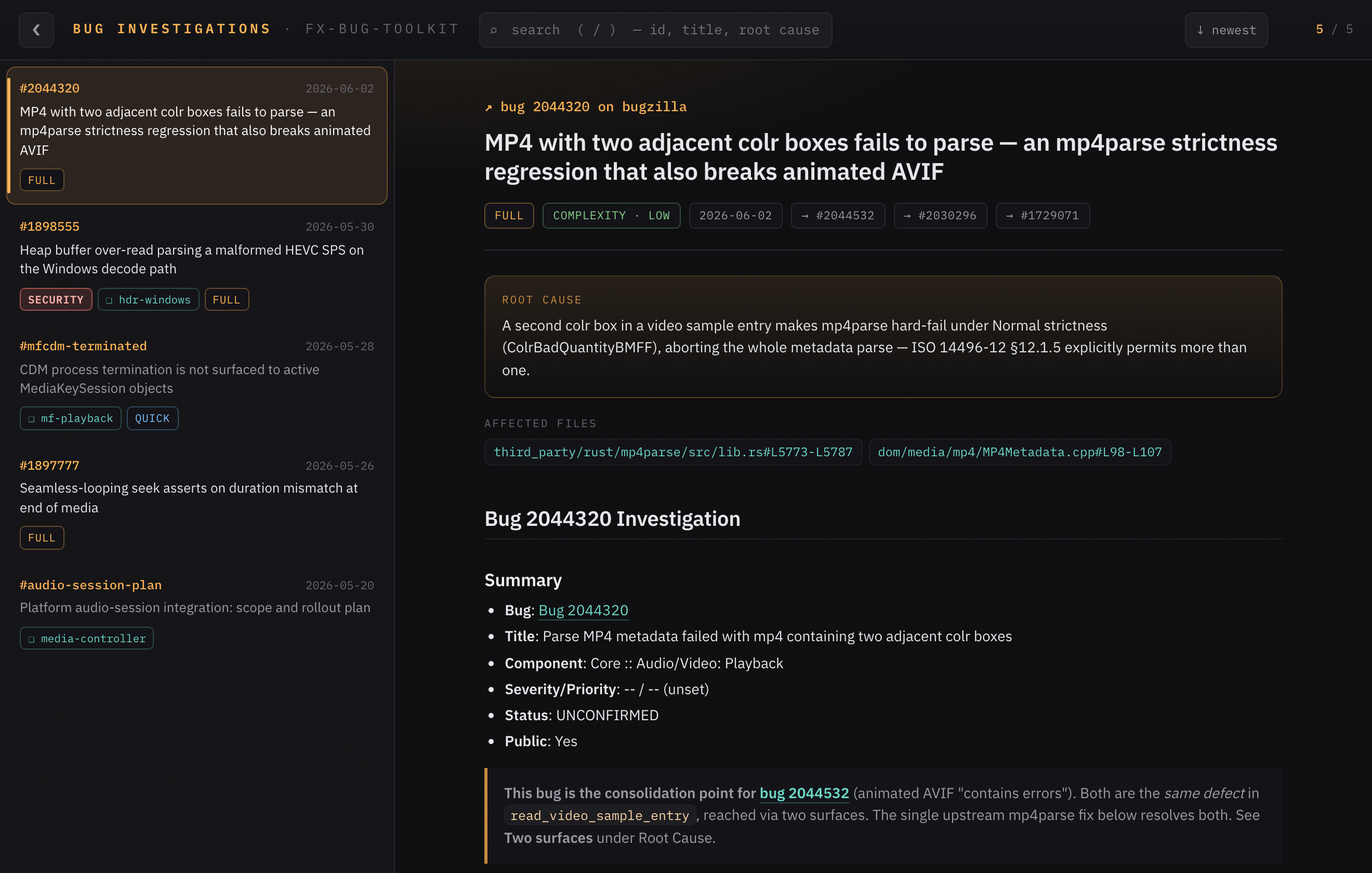
/bug-start on a real, public bug — frontmatter summary, root-cause callout, searchfox-linked affected files, and the rendered analysis.FX_BUG_INVESTIGATION_DIR. Optionally connect a shared team knowledge base via the firefox-wiki-plugin — purely additive; it works fully offline without it.Keyboard
| Key | Action |
|---|---|
| / | focus search · Esc clears it |
| w / s | move up / down the list (j/k too) |
| b / \ | fold / expand the sidebar |
Review a patch
/review D12345     # a Phabricator revision
/review local      # committed patches on the current branch
/review diff       # uncommitted working-tree changes
/review is the AI reviewer. It reads the patch, verifies its stated purpose against the relevant spec (via spec-check), checks architecture — threading, lifetime/ownership, IPC validation, error paths — reviews the code line by line, and writes a structured document to your review folder (~/.fx-bug-toolkit/patches-review by default; set FX_REVIEW_DIR to change it). Every finding is graded BLOCKER / IMPORTANT / MINOR / NIT and pinned to a searchfox file:line, so it's actionable rather than vague.
The toolkit owns the two review steps below — writing and landing the patch is your own workflow. A typical flow:
| Step | Whose | What |
|---|---|---|
| Implement the patch | your workflow | Write and land it however you normally do — that part isn't part of this toolkit. |
/review | this toolkit | AI review — purpose vs. spec, architecture, and code → the review document. |
/open-review | this toolkit | Your own human pass before the patch leaves your machine (below). |
Human guard — /open-review
/open-review                   # the current git repo
/open-review ~/firefox-12345   # a specific repo / worktree
Once the AI review is clean, you're the last gate. /open-review opens Revue — a local web UI — pointed at your repo. Browse the series worktree by worktree, leave inline comments, approve or deny each patch, then click Generate Review Prompt: Revue writes a single structured prompt and copies it, you paste it to Claude, Claude amends the commits, you reload and keep going. Approvals survive rebases.
/open-review <path>, or run it with no argument to reuse your remembered repo. Revue stores a default in ~/.revue/config.json (via revue init <path>): the first no-argument run asks which folder to open and remembers it, then later runs offer that default or a different folder. Revue shows the patch series — the commits that folder has on top of origin/main — so open a feature branch or worktree with unlanded commits; a clean checkout on an up-to-date main has no series and comes up empty. (The skill pre-flights this and asks which folder you meant if it finds nothing to review.)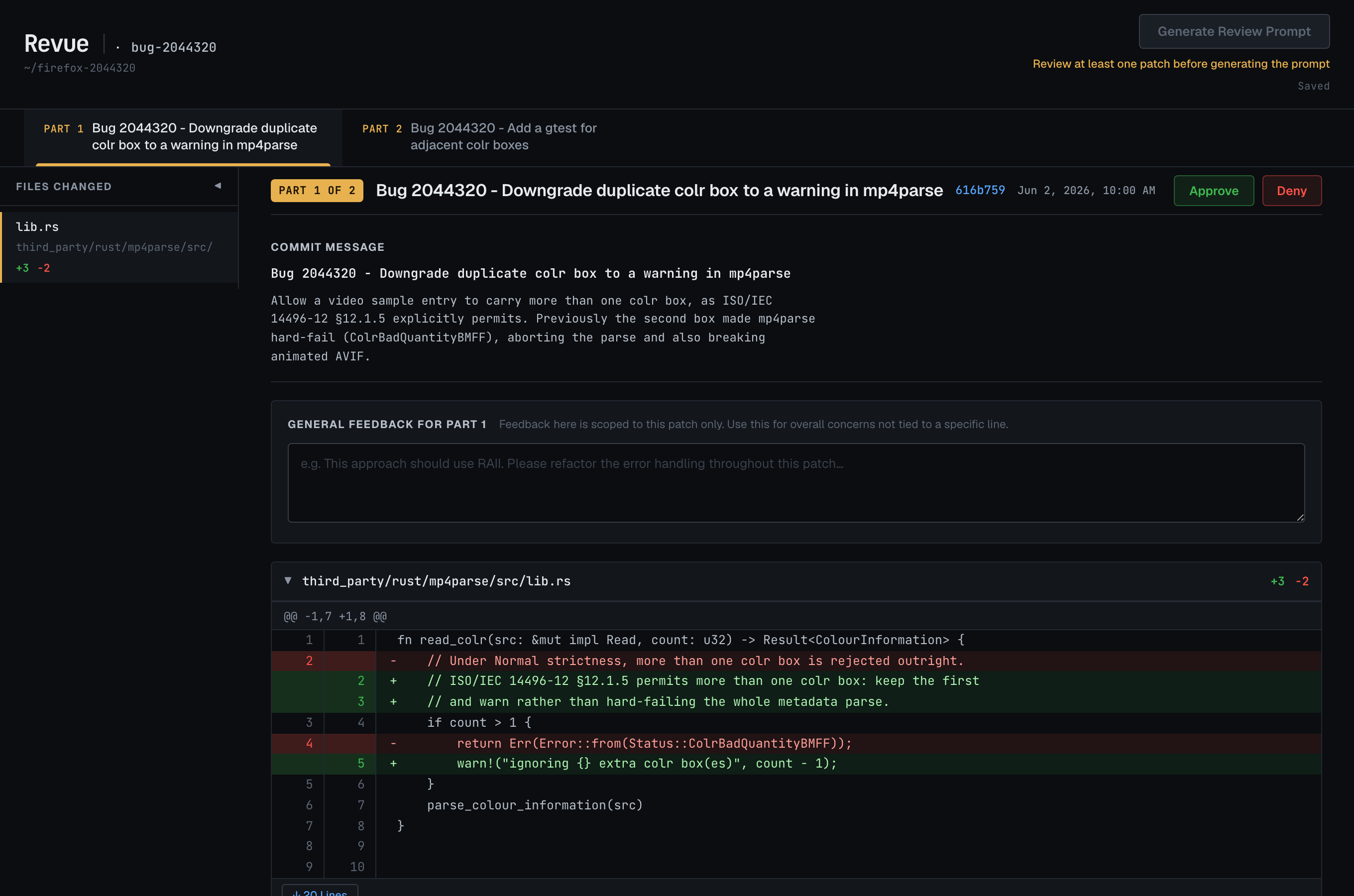
/open-review; /review itself needs nothing extra.Bug triage
A second workflow, for bug-triage duty. /triage does the analysis and writes a draft action for every bug in the components you cover; /open-triage is where you review, refine, and apply them. Nothing reaches Bugzilla until you approve it. It ships tuned for Audio/Video, but the component set is configurable — see TRIAGE_COMPONENTS below.
Two modes — read-only by default
Triage runs in one of two modes, decided automatically by whether a Bugzilla API key is configured. With no key it's read-only; configure a key and it becomes reply mode:
| Mode | When | What you get |
|---|---|---|
| Read-only (default) | no API key | Full AI analysis and a reviewable draft for every bug, plus the dashboard to read them — but no writes. No Apply, no needinfo, no owner CC me / NI me / Assign me. Reads run anonymously (so security-restricted bugs aren't visible), and no TRIAGE_OWNER is needed. |
| Reply | API key present | Everything above, plus writing back: post the comment, set needinfo / priority / severity / fields, the dashboard's Apply + Process queue, and the owner toggles. Also sees security-restricted bugs. Needs TRIAGE_OWNER (below). |
To enable reply mode, give bugzilla-cli a Bugzilla API key: run bugzilla-cli setup and choose write mode (or export $BUGZILLA_BOT_API_KEY) — grab a key from your BMO API-key prefs. With a key present, /triage selects reply mode on its own; with none it stays read-only and asks before anything that would need one. The same signal drives the dashboard — read-only shows a “read-only · drafts only” badge and hides every write control.
Setup
Triage talks to Bugzilla through bugzilla-cli (and reads bug reports with bmo-to-md — set BMO_API_KEY to let it read private/security bugs), plus a few environment variables. Reads need no API key (read-only mode); the variables below matter mainly once you're in reply mode. The first reply-mode run resolves what it needs — it asks for the owner email (and lets you set the component set) and persists your answers — so you normally don't set anything by hand:
| Variable | Default | What it's for |
|---|---|---|
TRIAGE_OWNER | reply mode | Your Bugzilla email — the address the dashboard's CC me / NI me toggles add to a draft (off by default, per bug). Only needed in reply mode — read-only needs none. The first reply-mode run asks for it and saves it. |
TRIAGE_DIR | ~/firefox-triage/ | Where /triage writes its drafts, watch list, and log — and where the dashboard reads them from. |
TRIAGE_COMPONENTS | 8 A/V components | Fully configurable — a ;-separated list of the exact Bugzilla component names to triage. Left unset, it covers the default eight Audio/Video components: Audio/Video, Audio/Video: cubeb, Audio/Video: GMP, Audio/Video: MediaStreamGraph, Audio/Video: Playback, Audio/Video: Recording, Web Audio, and Audio/Video: Web Codecs. The first run lets you keep these or set your own. |
FX_BUG_INVESTIGATION_DIR | ~/.fx-bug-toolkit/bug-investigation/ | Shared with /bug-start. When triage runs an investigation, it lands here and the dashboard shows the findings inline on the card. |
What /triage does
/triage                    # full session: bugs you're waiting on + new bugs from the last 14 days
/triage 2044320            # just one bug
/triage https://bugzilla.mozilla.org/buglist.cgi?bug_id=2044320,2044532   # every bug ID in the URL
A full session runs end to end, entirely on your machine:
- Polls the bugs you're waiting on. Every bug you've needinfo'd is checked for a reply — answered ones get re-triaged from scratch; ones silent for 14 days are proposed for closing as
INCOMPLETE. - Fetches new bugs filed or changed in the last 14 days in your configured components.
- Triages each bug in parallel (one background agent per bug). For each, it inventories what's already in the report (platform, version, steps,
about:support, attachments), analyzes any diagnostic artifacts — Firefox Profiler captures (through/analyze-profile), media logs, crash IDs — classifies the bug, searches for duplicates and a matching[meta]bug, and works out what's missing. - Routes each bug to one outcome (the dashboard tabs below). When there's enough to act on, it sets priority & severity to the A/V standard and — if the bug is fixable — kicks off a
/bug-startinvestigation so the findings ride along with the draft. - Writes one draft per bug to
$TRIAGE_DIRand opens the dashboard. It never posts to Bugzilla itself — every decision is a reviewable draft.
Review on the dashboard
/open-triageOpens a local web UI over the drafts on 127.0.0.1:9001 (falls back to a free port if 9001 is taken). Each bug is a card: the current Bugzilla state, the proposed comment, the priority/severity it'll set, and — when triage investigated it — the /bug-start findings inline.
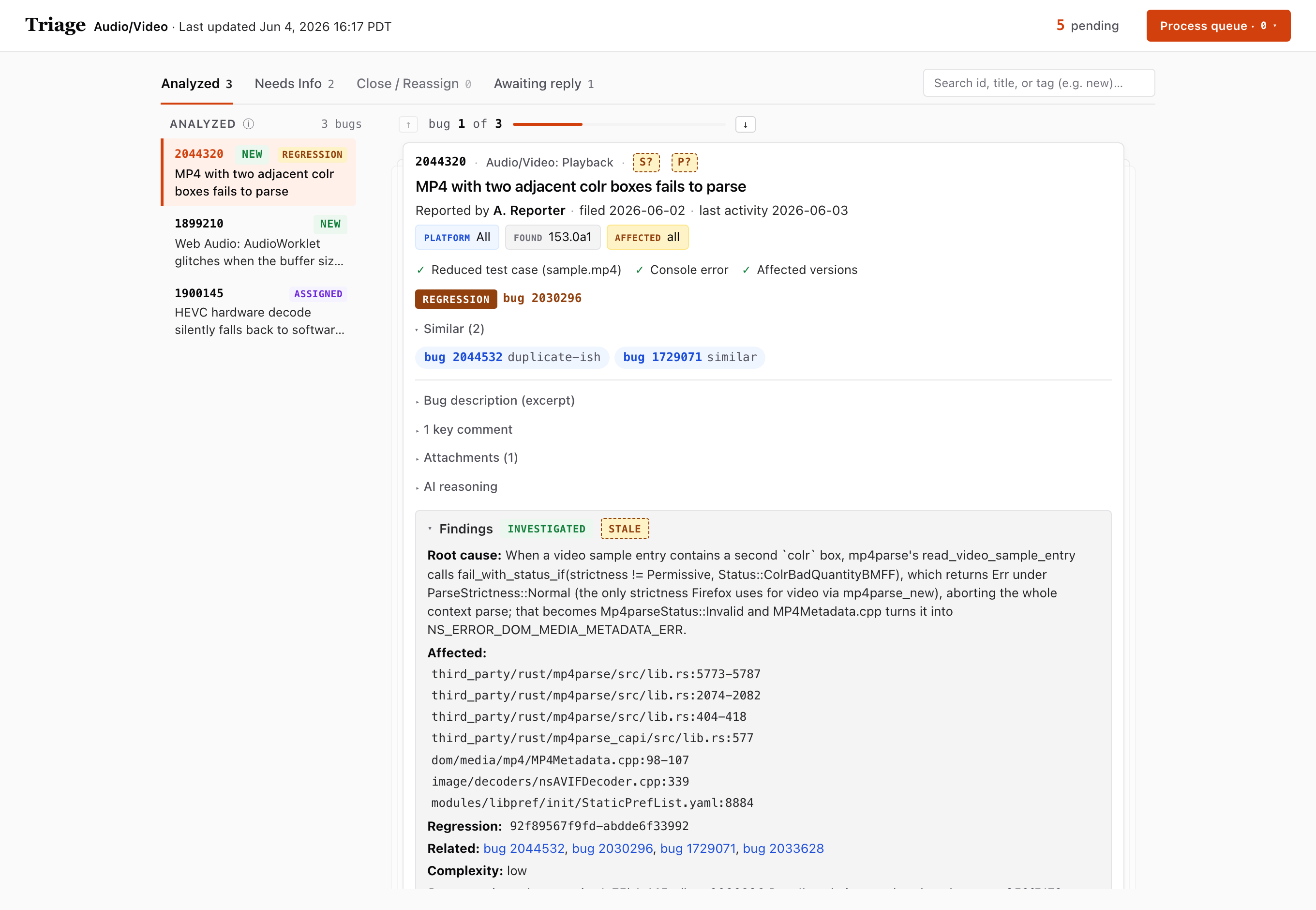
The four tabs are the four outcomes triage decided for each bug:
| Tab | What's in it | The draft is… |
|---|---|---|
| Analyzed | Bugs triaged with a root cause or a clear assessment | a public comment with the analysis, plus the severity/priority it will set |
| Needs Info | Bugs missing something from the reporter | a needinfo question asking only for the missing items |
| Close / Reassign | Duplicates, invalid bugs, or ones in the wrong component | the closing (INCOMPLETE / INVALID / WORKSFORME) or hand-off comment |
| Awaiting reply | Bugs you've already needinfo'd and are waiting on | — a watch list; an entry is flagged stalled after 14 days with no reply |
The Process queue — how nothing ships by accident
The dashboard is read-only toward Bugzilla. Every action on a card just queues an instruction; nothing is posted from the web UI:
- Revise draft — type feedback in the card's box; it queues a refine so the next drain re-drafts that comment (a tricky one can spin up a fresh investigation first).
- Apply — queues the write: post the comment and set the fields (priority/severity, blockers, resolution, …). It's a toggle — click Applied again to un-queue it.
- CC me / NI me — adds your
TRIAGE_OWNERaddress to the draft's CC or needinfo; a checked NI me is the “ready for me to pick up” signal.
Queued actions collect under Process queue (top-right). When you're ready, open it and hit Copy prompt → paste into Claude: paste that short prompt into a Claude session and it drains the queue — applying your refines and running bugzilla-cli apply for each queued write. Each apply asks you to confirm before it posts, so the production write to Bugzilla is always gated on an explicit yes.
/open-triage (the firefox-triage-dashboard app — FastAPI, in a managed virtualenv); override its port with PORT. /triage works without it — it just writes the drafts to $TRIAGE_DIR.Review-team dashboards
/open-team             # the landing page — pick a team
/open-team playback    # straight to one team
/open-team opens firefox-review-stats — per-team dashboards for Firefox review groups, published live and refreshed weekly by a GitHub Action. There's nothing to install and no local server: it's a hosted website, so the skill just opens it — the landing picker by default, or a named team (playback, webrtc, gfx) straight away.
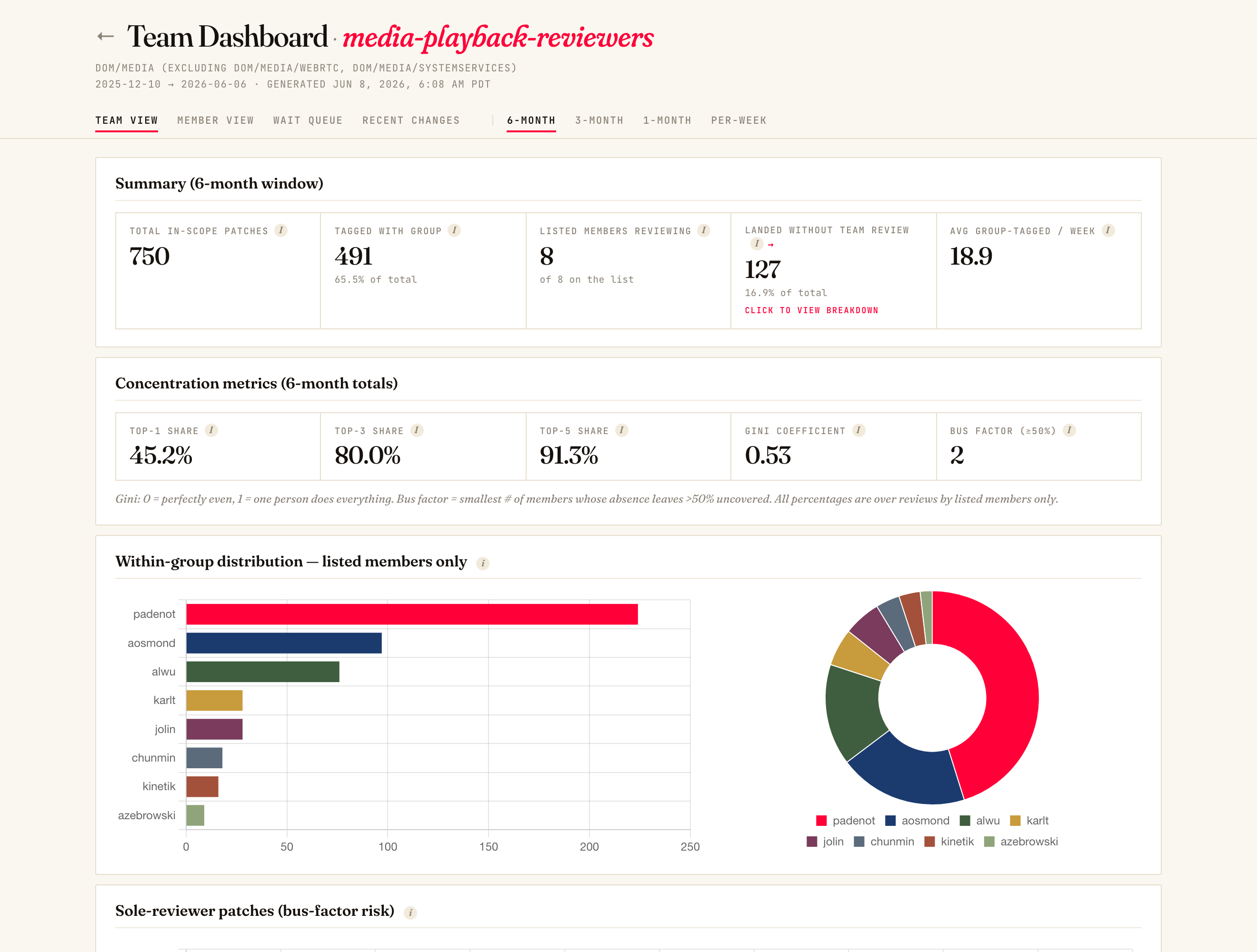
Each team page has four views — cycle them with ←/→:
| View | What it answers |
|---|---|
| Team View | How review load is distributed and how concentrated it is (the metrics below). Toggle the window with Shift+←/→: 6-/3-/1-Month and Per-Week. |
| Member View | A per-member profile — weekly reviews + patches submitted, whose patches they reviewed, and wait times when they're the author. |
| Wait Queue | In-scope, member-authored revisions sorted by longest wait first, linked straight into Phabricator. |
| Recent Changes | A plain-language, LLM-summarized digest of what the component shipped (This Week / This Month), grouped into feature areas. |
The Team View is the load picture at a glance:
- Summary — in-scope patch count, what % carried the group tag, how many listed members are actually reviewing, and "landed without team review" (with a foldable drill-down).
- Concentration metrics — Top-1 / Top-3 / Top-5 share of reviews, the Gini coefficient (0 = perfectly even, 1 = one person does everything), and the bus factor (how few members leaving would drop >50% of reviews uncovered).
- Within-group distribution + sole-reviewer patches — who's carrying the reviews, and which patches only one person could have reviewed (the bus-factor risk surface).
…/playback/#queue, this week's digest is …/#recent/1w, a 3-month rollup …/#team/3m. It's a read-only public site: no Bugzilla/Phabricator writes, no local data, no key.Accumulated knowledge database (optional)
The firefox-wiki plugin gives the toolkit a persistent, cited knowledge base, so Claude stops redoing the same code archaeology every investigation. It's one idea: read the wiki before searching code, write back what you learn after — so each bug starts from everything earlier bugs taught it, instead of re-deriving the same facts. It's hook-driven and automatic: install it, work normally, and the loop runs in the background.
How the loop works — automatically
You don't invoke any of this; hooks do both halves:
- Before a code search — a hook checks the wiki first (alias- and
Class::Method-expanded, soMDSMstill findsMediaDecoderStateMachine). If it already has the answer, Claude reads the cited facts and may skip the search. - After a commit — a hook reads the diff/investigation, extracts the durable facts, and writes them back for next time.
- After any wiki write — a quick lint flags broken links and stale references; wiki use is tagged per skill so
statscan show what actually consults it.
The lookup, ingest, lint, and verify skills run via those hooks — they're not in the slash menu and you never type them.
What makes it useful to Claude
- Every fact is cited. A Searchfox permalink, a spec section, or a Bugzilla bug number backs each claim — never written from memory. So a lookup hands Claude a verifiable fact with the exact source to confirm against, and the
verifyhook can re-read those sources later and flag any that have drifted. Citations are what make the knowledge trustable instead of a pile of guesses. - It's a linked web, not flat notes. Pages connect with
[[wiki-links]]acrosscomponents/(one class or subsystem each),relations/(how components interact),patterns/(reusable mechanisms), andarchitecture/(end-to-end pipelines). Pulling up one page brings its neighbours, so Claude gets cross-component context — aMediaDecoderStateMachinelookup also surfaces the AudioSink relation and the data-flow pattern it links to, not just one isolated page. - Jargon still resolves. The pre-lookup hook expands abbreviations and
Class::Methodnames from the wiki's alias map, soMDSM,MediaDecoderStateMachine, andMDSM::DecodeLoopall land on the same page — Claude doesn't have to know the exact title. - The check is cheap. Lookups read a compact derived index (
index.json) first and only fall back to the full index when needed, so checking the wiki before every code search stays fast.
The commands you do type
| Command | What it does |
|---|---|
/firefox-wiki:add <input> | Add knowledge by hand — a spec URL or PDF (distilled into specs/), bug NNNN (extracted from the bug), or a plain-language fact (e.g. "AudioSink runs on the MDSM task queue, not its own thread"). |
/firefox-wiki:stats | Usage metrics — lookup hit rate, most-consulted pages, false-confidence rate, and coverage gaps (run it ~monthly; see below). |
/firefox-wiki:init | One-time setup (below). |
/firefox-wiki:stats about monthly to see whether the wiki is paying off and where to invest:
- Hit rate — how often a lookup already had the answer. Rising = the wiki is doing its job; flat-and-low = it's too sparse to lean on yet.
- Most-consulted pages — your load-bearing knowledge; keep these accurate (let
verifyre-check them, fix promptly). - False-confidence rate — lookups that returned a fact later found wrong. Anything here is a priority: re-verify and correct those pages.
- Coverage gaps — topics searched but not yet in the wiki: the best candidates to write up with
/firefox-wiki:add.
Set it up
The plugin (the tooling) and the wiki content (the knowledge) are separate things. Install the plugin once, then point it at a wiki — your own, or a shared team one.
1 — Install the plugin (in your terminal). It needs jq, pandoc, and bmo-to-md:
claude plugin marketplace add alastor0325/firefox-wiki-plugin
claude plugin install firefox-wiki@firefox-wiki-plugin
2 — Point it at a wiki. Shared vs. personal is only which git repo WIKI_PATH points at (default ~/firefox-wiki):
- Your own wiki — set
WIKI_PATHto your own wiki repo (or a fresh directory) andinitscaffolds the structure. Nothing team-specific required — you build knowledge as you go. - A shared team wiki — clone the team's content repo to
WIKI_PATHfor its accumulated knowledge. The Firefox-media team's content lives in a private repo; request access from its maintainer. Without it you simply start from your own (empty) wiki.
# ~/.claude/settings.json — point at your own wiki (init can persist this for you)
{ "env": { "WIKI_PATH": "/Users/you/my-wiki" } }
3 — Initialize in Claude Code, then restart. It verifies the dependencies, scaffolds the wiki, installs the pre-lookup hook, and offers to persist WIKI_PATH:
/firefox-wiki:init[[wiki-links]] — open $WIKI_PATH as an Obsidian vault to explore the linked graph visually.